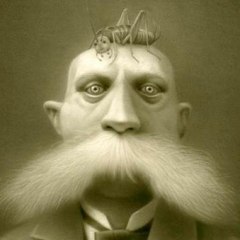
October 4, 201115 yr comment_93253 Greetings, One of the avatar choices I currently have in the shop does not have 'MD' on it anywhere, as far as I can tell. I'm not sure if this is a big concern, I suppose it just doesn't clarify that it's property of MagicDuel. [img]http://magicduel.com/img/skin/default/spacer.gif[/img] Hedge -- OK, so I bought the avy, so I could get the image alone, (Paint wasn't working.) Here it is: [size=3][b][color=#003366][url="http://storenow.net/my/?f=3294"]http://storenow.net/my/?f=3294[/url][/color][/b][/size] Edited October 5, 201115 yr by Hedge Munos Report
October 5, 201115 yr Author comment_93357 As there is no interest in this topic, I assume it is unimportant. I will return the avy to the shop. Please close this thread -- Thank you, Hedge Report
October 6, 201115 yr Root Admin comment_93378 did you bother mailing [council]? i would have thought they would do something in regards to this. Report
October 6, 201115 yr comment_93384 Also check again: if you have a medal, the MD symbol might be hidden behind. I am experimenting this with my current avy. Report
October 6, 201115 yr Author comment_93394 I've contacted [email="contact@magicduel.com"]contact@magicduel.com[/email] -- I'll leave it up to them to decide what to do. Thanks, Hedge Edited October 6, 201115 yr by Hedge Munos Report



Join the conversation
You can post now and register later. If you have an account, sign in now to post with your account.