


Skip to content
View in the app

A better way to browse. Learn more.

MagicDuel Community

A full-screen app on your home screen with push notifications, badges and more.

To install this app on iOS and iPadOS
  1. Tap the Share icon in Safari
  2. Scroll the menu and tap Add to Home Screen.
  3. Tap Add in the top-right corner.
To install this app on Android
  1. Tap the 3-dot menu (⋮) in the top-right corner of the browser.
  2. Tap Add to Home screen or Install app.
  3. Confirm by tapping Install.

Looking for an Avatar (sent to store instead of Vault D'oh!)
Featured Replies

I was silly and instead of swapping an avatar to my vault, it seems I mistakenly sent it to the MD Store again.
If someone finds this avatar, I'd love to coordinate the transfer, and will work with you for payment for getting it back in my possession again.

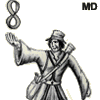
The avatar looks something like this (but smaller, and more avatar-like)
[spoiler]
[img]http://everthor.ipower.com/images/Gort_paper.gif[/img]
[/spoiler]
Drawn by Duke of Malfi, for Gort Hedera.

Edited by Maebius

  • 2 weeks later...
  • 2 weeks later...
  • 5 weeks later...
  • Author

ever-hopeful BUMP.
Also if anyone has a nice girly avatar, I'm interested in that if the original can't be located.

  • 2 weeks later...
  • Author

Mods are welcome to please close/delete./kill/etc this thread. All set.
I have not found that avatar exactly, but found one that fits close enough for my tastes.

Guest
This topic is now closed to further replies.

Forum Statistics

  • Total Topics 17.5k
  • Total Posts 182.2k

Account

Navigation

Search

Search

Configure browser push notifications

Chrome (Android)
  1. Tap the lock icon next to the address bar.
  2. Tap Permissions → Notifications.
  3. Adjust your preference.
Chrome (Desktop)
  1. Click the padlock icon in the address bar.
  2. Select Site settings.
  3. Find Notifications and adjust your preference.