


Skip to content
View in the app

A better way to browse. Learn more.

MagicDuel Community

A full-screen app on your home screen with push notifications, badges and more.

To install this app on iOS and iPadOS
  1. Tap the Share icon in Safari
  2. Scroll the menu and tap Add to Home Screen.
  3. Tap Add in the top-right corner.
To install this app on Android
  1. Tap the 3-dot menu (⋮) in the top-right corner of the browser.
  2. Tap Add to Home screen or Install app.
  3. Confirm by tapping Install.

Looking To Buy A Specific Avatar
Featured Replies

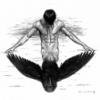
I just saw it in the Artisan thread... I have no idea if it's even in the system or not... It was done by Blackthorn...

[img]http://magicduel.invisionzone.com/uploads/monthly_10_2008/post-1939-1225103101_thumb.jpg[/img]

Any information is welcome as well.


Edit: Ok, looking for this one as well: http://magicduel.invisionzone.com/index.php?app=core&module=attach&section=attach&attach_rel_module=post&attach_id=542

Edited by Ravenstrider

  • Author

Doesn't he wear the one with black wings and sword raised in the air?

And thank you on the info, I'll check it out.

I believe this avatar may still be worn by someone in game. I can't recall who, unfortunately.

As to the one that Raven wears, that one was done by Glor specifically for him, so if anyone sees it in the shop randomly, let me know.

  • Author

I think the avy was submitted in the same batch as your avy, Shadowseeker... Not sure though...

Eh, I guess I'm just unlucky. ^.^

That Jason avy is mine. Not in use but still in my [b]v[/b]ault.

*LOL..thanx..chew,i.supposed.you.have.to.edit.this.one.too?

Edited by Poppitz Resurrection
Removed dots and replace with spaces :D

Guest
This topic is now closed to further replies.

Forum Statistics

  • Total Topics 17.5k
  • Total Posts 182.2k

Account

Navigation

Search

Search

Configure browser push notifications

Chrome (Android)
  1. Tap the lock icon next to the address bar.
  2. Tap Permissions → Notifications.
  3. Adjust your preference.
Chrome (Desktop)
  1. Click the padlock icon in the address bar.
  2. Select Site settings.
  3. Find Notifications and adjust your preference.