

Skip to content
View in the app

A better way to browse. Learn more.

MagicDuel Community

A full-screen app on your home screen with push notifications, badges and more.

To install this app on iOS and iPadOS
  1. Tap the Share icon in Safari
  2. Scroll the menu and tap Add to Home Screen.
  3. Tap Add in the top-right corner.
To install this app on Android
  1. Tap the 3-dot menu (⋮) in the top-right corner of the browser.
  2. Tap Add to Home screen or Install app.
  3. Confirm by tapping Install.

Neno's item artworks and avatars
Featured Replies

  • Author

tnx Reggie always happy to hear critics. especially the good ones :)


and i have another one ready for the shop. but first its open for biding for a really short time. starting bid one gold or 5 credits.


http://storenow.net/my/?f=dd83f919709d74862c6f5cd04c51b3ce

  • 3 weeks later...
  • 1 year later...
  • Author

Heres a ring that goes to players equipment inventory (slots 9 and 10). Its magic attributes, if any, arent known yet.
 
[edit: Ring hidden by chewett, its going to be a secret :D]

Edited by Chewett

its bee a while i posted here..

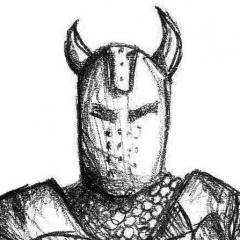
heres something thats about to be uploaded to MD avy shop but wanted to give a chance to anybody that would like to have it exclusively. reserving rights are gonna cost u one gold coin. offer ends soon because im eager to let it go! :)


http://storenow.net/my/?f=ce10190e9c76a04995725d3f9b6de319


Late but hey, I like this one!

Join the conversation

You can post now and register later. If you have an account, sign in now to post with your account.

Guest
Reply to this topic...

Forum Statistics

  • Total Topics 17.5k
  • Total Posts 182.2k

Account

Navigation

Search

Search

Configure browser push notifications

Chrome (Android)
  1. Tap the lock icon next to the address bar.
  2. Tap Permissions → Notifications.
  3. Adjust your preference.
Chrome (Desktop)
  1. Click the padlock icon in the address bar.
  2. Select Site settings.
  3. Find Notifications and adjust your preference.
