


Amoran Kalamanira Kol
Member
-
Joined
-
Last visited
Everything posted by Amoran Kalamanira Kol
-
Happy Birthday Shem!
-
[quote name='Pipstickz' date='04 June 2010 - 11:02 PM' timestamp='1275710530' post='61063'] Sparr has a GG loaded with tokens, and a bunch of rusties to boost it. [/quote] I didn't say he doesn't use tokens, I said he can go up against tokens with his stats and win.
-
I will speak honestly about my opinion about all of this muck. I will say ahead of time that I do not care if you all decide to spam me with negative rep points because of this post. The Golden Globe hurts the game and helps the game. It hurts the game in that people do not properly learn how to fight and it unbalances the game because with the training area as it is, a lower mp level can gain high stats and excel more than that particular mp level is supposed to. (Mp3, Mp4) It helps the game in that it seems to have been the only thing that has held many people to the game. The training is boring, and is not always the most effective method of training, but it is similar to how willows was. Now my whole reason for wanting to keep the Golden Globe as a working training area after the MRs abandoned it was because MRD put a lot of work into trying to make it something useful for not only the MRs but for other people as well. Back in the days when Willows Shop was all the rage, I could not sit in the location and enjoy conversation because no matter what I did any ritual I put together got immediately plowed by Drachorns. So, I stopped going to the area and searched for other methods of enjoyment. I would stop by and converse, but I truly did not know much about fighting, and by the time I was almost a year old.. I decided that I should try to get stronger. I fought the old fashioned way and bought/traded creatures. Many creatures were given to me by friends who had decided it was time for them to leave. So, in essence, I learned to fight by old fashioned fighting. This did nothing for my stats however. The Golden Globe helped me get strong enough to fight the drachorn fiends and those who possessed tokens. It has helped me since I became a new mp5 since I was eager and willing to participate in the Heads Contest. I learned methods of training and ways of fighting by [b]experimenting[/b] outside of the GGG and [b]asking questions[/b] once I began to train. This is why I do not always agree with what is considered a "spoiler". Some things you simply HAVE to ask to understand. I have suggested multiple times that the GGG be reformed, that we should teach ways to fight as well as train. In my opinion, with tokens dominating the game and with so very little to do, I do not think that getting rid of the Golden Globe will achieve what the people who are against it want it to achieve. Perhaps if these people would stop whining about everyone gathering at the GGG and start asking WHY people gather there, they would understand. Some say stats have become useless, but in truth they are only another method of fighting. If your stats are high enough, you can defeat tokens (Sparrhawk is a perfect example of someone who can beat tokens with his stats)- and at least the GGG gives newer mp5's a chance to do that without spending so much money on the game. What I will never understand is why there has to be categories of people, you fight or you don't, you role play or you don't, you use tokens or you use stats... What is wrong with role playing, fighting, using tokens, and using stats? There is nothing wrong with it, and the fact that people don't realize this will hurt the game even worse than it already is.
-
I was emailed this by someone who was sitting in the GGG during the time that redneck decided he would repeatedly attack those training within and I have heard that during those attacks he also decided to repeatedly silence those who were angry with him for attacking, to prove BFH's point.. I do not feel that this is the proper way to protest the Golden Globe. There are ways the Golden Globe helps the game and ways that it hurts the game, perhaps it should simply be reformed rather than destroyed.
-
[quote name='genocidal' date='03 June 2010 - 07:44 PM' timestamp='1275612263' post='60929'] Sen no D no Be is what was said by the ghostly aperation of mya. From this it has come to be known that Sen stood for sentinal. Any more then this has not currently been found out yet. [/quote] Sentinel no Darigan no Betrayl? Hm.. This is getting interesting.
-
Fun was spoiled? Wow, I couldn't tell. As to the quest, I am glad that this story quest took place, despite the difficulty of getting it started, it seems to have spiced up the game and added some interest, and a reward or two to work toward isn't all that bad either.
-
[quote name='Udgard' date='31 May 2010 - 10:34 PM' timestamp='1275363285' post='60737'] I see a lot of dst =b And no.3 is definitely Amoran and Akasha. [/quote] I disagree! All of da cookies are minez.
-
A surprise is almost finished. *evil cackle* I have a feeling you all will love this next batch.
-
It is a lovely bit of writing, I'm glad to have read it. I did not know you were talented with words as well.
-
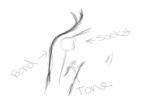
I think it is well done for a first try after not having drawn for such a long time. I've got to admit, I'm not a huge fan of the anime style of art because it removes a lot of detail from an artwork, but I think you did well. I have a suggestion with the shoulder, perhaps smooth the rounded area a bit? A shoulder should curve (to show the area where the bone meets the socket) and then go somewhat straight. If there is muscle tone in the arm it would show up a few inches, maybe more from where the shoulder socket is. Here, I drew up a small example for you. I hope this helps. ^^;
-
Happy Birthday Seeker!
-
I am sorry to hear this but.. after speaking with you in YIM about your situation, I do not blame you. I only hope that things will turn out well for you and your family in the end.
-
Your.. selling Eden's old avatar. :|
-
I am in agreement with closing this topic. The forum does not need anymore flaming.
-
Happy Birthday
-
As always Jon, you do exceptional work. I cannot wait to do a collaboration with you.
-
Happy Birthday!!
-
[quote name='Burns' date='04 May 2010 - 04:38 AM' timestamp='1272965913' post='59373'] Happy B-Day, be prepared to eat a whole lot of cookies if you meet me today! =)) And please, try to not set everything on fire when lighting the candles... [/quote] Awe, but thats no fun.. [quote name='Tarquinus' date='04 May 2010 - 01:57 AM' timestamp='1272956264' post='59369'] Happy b-b-b-birthday, you thing from another world, you. [/quote] Thank you!! And I'm not that far out am I? Naaaaah. [quote name='Grido' date='04 May 2010 - 10:04 AM' timestamp='1272985487' post='59390'] May the 4th be with you!!! wait, i mean, Happy Birthday!!! [/quote] Behold! The light stick! Thank yous Grido. @Everyone: Thank you all for remembering my birthday!!
-
EEEP! You all found me and forced me to come out of hiding! Thank you all for wishing me a happy birthday, it hasn't quite happened yet where I am, but lets hope its a good one!
-
You will be missed, no matter if you think otherwise. Keep up faith my friend, I will have you in my thoughts. *hugs tight*
-
[quote name='Shadowseeker' date='03 May 2010 - 11:36 AM' timestamp='1272904608' post='59250'] 19 silver. [/quote] Meanie.
-
1 gold coin.
-
[quote name='darlec77' date='01 May 2010 - 07:50 AM' timestamp='1272718220' post='59066'] Interlased causes the GIF to act similar to an interlased JPEG: It splits the image into rows of pixels and and numbers them repeatedly e.g. 1-3,1-3 or 1-5,1-5. When the image is displayed in a browser the browser innitiates scans (how many dependes on the greatest numbered row). A scan is where the browser dispays rows of a certain number. The browser repeats the scans until the image is displayed at full quallity. At the first scan there the image is of low quality but after each scan it increaces in quality. The interlased JPEG/GIF ability is only normally useful if the file size is very lage and you want your user to be able to use(e.g image map)/see the image ASAP. Therefore in smaller file sizes interlasing a JPEG/GIF only increaces the file size and loading time. [/quote] Thank you very very much for explaining that. I've been playing with Photoshop for awhile and not once did I ever have any inkling of an idea as to what 'interlaced' was. @Irene: If you've got a tablet you can also just make a transparent canvas (upscaled of course) and do the avatar using the tablet. Its difficult to make it look hand-drawn unless you have a certain brush type (charcoal, natural, etc.). But yeah, tablets are fun and I'm glad it helped. @Sir Kamil: PM me what questions you have and I will try to answer them to the best of my ability.
-
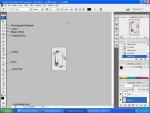
[size=5][u][b]Photoshop CS3[/b][/u][/size] Before I begin, I would like to say that I have Photoshop CS3, every Photoshop version is somewhat different, but versions CS1 and CS2 may be similar to CS3. I am not certain of this. Not everyone will do this process the same as I do and not everyone has Photoshop. There are most likely simpler ways to edit the avatars, but this is simply the method I tend to use. [u]First: Cropping/Cutting[/u] When you open your picture, cut away a lot of the white space by cropping the main part of the picture. I do not use the crop tool usually, but instead I use the rectangular marquee tool. It works a bit easier and gives you some room to fix mistakes if you mess up. [u]Second:[/u] Cut and paste the selected canvas into a new area. [u]Third: Adjusting/Lightening and Darkening - etc.[/u] Then go to 'Image' and 'Adjustments'. You can adjust the image by either tinting the black space using the 'color balance' tool, or use levels to lighten/darken the image with the 'Levels' option. This helps with clarity when you resize. [u]Fourth: Greyscale[/u] Depending on how you have adjusted the image with color balance and 'levels', you can choose to use the greyscale option in the 'Image --> Mode --> Greyscale' tab. This will flatten the image. [u]Fifth: Remove flaws[/u] Now because I am picky, I usually go through using the eraser tool and remove any little splotches in the white area that may have come off with the graphite, but the white area will be removed soon anyway. [u]Sixth: Resizing[/u] Now you will need to revisit the 'Image' tab once more and go to 'Image size'. Be certain that the 'Constrain Proportions' option is enabled, otherwise it may warp the image. I normally start with the 'height' first as the width will automatically adjust when you enter the proper number. (In this case 160x100. But depending on how the image is cut, it will resize without warping it, thus it might leave it a bit off of the proper size.) [u]Seventh: Adjusting the Size[/u] Continue to remove as much of the white space as you can with either the 'cropping' tool or the 'rectangular marquee' tool. Be certain to open in a new window, adjusting the size of the new window to 160x100. Make sure that you set the 'Background Contents' to 'Transparent' when you make the new window. When you paste your picture, if the image is still not quite fitting in the window, go to the 'Edit' tab and choose 'Transform --> Scale'. You will see that the area is able to be manually adjusted, to keep the image shape, hold down the shift key as you adjust. [u]Eighth: Removing the White Space.[/u] BE CERTAIN THAT THE BACKGROUND LAYER IS REMOVED! If it is not removed, the image will not show up as transparent. Now that the image is in the center of the resized space, use the 'Magic Wand' tool to remove a lot, if not most of the outer white space. If you have shaded the image heavily, I would not suggest using the magic wand tool in the inner white space of the picture as it can take away a lot of the quality. Instead I would suggest upscaling the image to 300-600% (using the scaling area in the lower left hand corner) and manually removing the white space with the 'Lasso' tool and the 'Eraser' tool. [u]Ninth: Adding the MD Symbol[/u] Use the type tool and select a simple, clear font at around 2-10pts. depending on which font you use. I would suggest Arial, Tahoma, Comic Sans..etc. [u]Tenth: Saving as a Transparent GIF[/u] Go to 'File --> Save for Web & Devices' be certain to select the 'GIF' option. You can give it a dither but I've found that this tends to make the image look a bit scratchy, you can also click 'Interlaced' though I'm not entirely certain what that does. Sorry folks, that tiny bit I haven't figured out yet, but it doesn't appear to harm the image so, eh- I click it anyway. And last, hit 'Save' and name it. Finally, you are ready to upload the avatar. Tips:[list] [*]I would suggest keeping the image in the MD style, if you use too much shading the picture will look somewhat flat and be difficult to edit. The shading may come out looking strange and not give the desired effect as well, so I would stick to light shading or 'sketching' when making these avatars. [/list][list] [*]If you have a tablet, use it as much as possible, it makes this whole thing ten times easier. [/list][list] [*]You can darken/lighten in several ways in photoshop, there is also a tool called the 'Burn' tool that helps with darkening certain areas. So if you want some shading to stand out more while others you want to 'fade', darken certain areas with this. It will give your avatar a polished look. [/list][list] [*]Do not make the image too dark, if it is too dark it will look too contrasted against the textured background of MD. You can lighten the image by using 'Image --> Adjustments --> Levels or Brightness/Contrast'. Both work equally well. [/list] Again, not everyone will do this process as I do, and there are probably simpler ways.. but I do hope this helps for those of you who decide to go to photoshop.com and download the free trial. Not sure if it will help with the GIMP program that Yrthilian had suggested, I have never used that particular program before. If you know of easier ways to do this, please post them below. [img]http://magicduel.invisionzone.com/public/style_emoticons/default/smile.gif[/img] EDIT: Free TRIAL not trail. Stupid lack of sleep.
-
It is truly a sad day, one of our most proud, most passionate in Loreroot is going invisible. Those of us in the Eclipse were honored to have you serve with us, and we are even more honored to call you a friend (in game and out). Should you ever wish to talk to someone, you know very well how to get ahold of me.





