



MaGoHi
Member
-
Joined
-
Last visited
Everything posted by MaGoHi
-
judged was according to these categories: dish complexity presentation description "md topic bonus"(used MD ingredients) creativity WINNER WINNER CHICKEN DINNER! 1.LAZARUS: 39/50 2.AILITH: 30/50 3.DEMONIC GOD : 29/50 4.TROLA: 28/50 4.MIQ: 28/50 6.TISSY: 26/50 7.STENO: 22/50 7.CHEWETT: 22/50 9.UNGOD: 21/50 once i remember what prices i had in mind i will let them reach you ???? the detailed points with statments from my trusty judge are hidden here:
-
with this the quest is closed!
-
WILL, as in willpower, because if you really want something and you have the will to get it you will sacrifice things and find a way
-
xD
-
yeah but do try to get it done as fast as possible
-
you do the counting

-
great people here *wipes a tear*
-
you are very welcome!
-
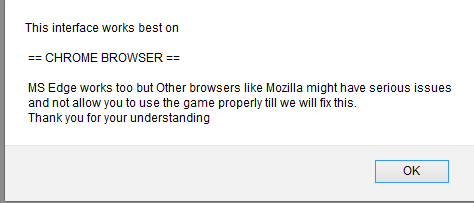
I, MAG THE (self proclaimed) KNIGHT OF BACON AND (also self proclaimed) OVERLORD OF GWI AM HUNGRY (yes again). I NEED YOU AGAIN TO BE IN THE KITCHEN AGAIN, CONQUER THE POTS AND PANS, CHOP THE INGREDIENTS, MAKE THEM YIELD TO YOUR WILL! YOU WILL HAVE TO DESCRIBE WHAT YOU MADE AND PROVIDE ME WITH AN IMAGE, I WANT TO KNOW WHAT I AM SERVED AFTER ALL I AM HUNGRY BUT I KNOW THAT PERFECTION NEEDS TIME SO I WILL WAIT UNTIL END OF APRIL. EVERYONE COOKING WILL RECEIVE 5 SILVER COINS. WINNERS WILL BE ABLE TO PICK FROM A SUPER FANCY, SUPER AWESOME, SECRET STASH OF AMAZINGNESS, THINGS STUFF, REWARD POOL THINGY tldr: cook a dish and make it MD themed describe what you made provide a picture (with name and date please) deadline end of april looking for judges Reward, pick from a poolWhenever i log in after a long enough time (usually sleep so i guess like 8ish hours) i get a notification that my scene changed - but it did not - then it reloads the page automtically - this removes all open popups - including bounties (i was lucky that the giftbox showed up again afterwards) very annoyinglet me permanently remove the "switch to chrome message" after log in, it is pissing me off i will not change to chrome
 I was called a VIP *dances*the heat orbs, notification bell and update button disappear when i scroll, i marked them RED (yes i marked the shop instead of the update button i can not read the text well, marked ORANGE some alternative position for the heatorbs i think would be better, marked in GREEN








Account
Navigation
Search
Configure browser push notifications
Chrome (Android)
- Tap the lock icon next to the address bar.
- Tap Permissions → Notifications.
- Adjust your preference.
Chrome (Desktop)
- Click the padlock icon in the address bar.
- Select Site settings.
- Find Notifications and adjust your preference.
Safari (iOS 16.4+)
- Ensure the site is installed via Add to Home Screen.
- Open Settings App → Notifications.
- Find your app name and adjust your preference.
Safari (macOS)
- Go to Safari → Preferences.
- Click the Websites tab.
- Select Notifications in the sidebar.
- Find this website and adjust your preference.
Edge (Android)
- Tap the lock icon next to the address bar.
- Tap Permissions.
- Find Notifications and adjust your preference.
Edge (Desktop)
- Click the padlock icon in the address bar.
- Click Permissions for this site.
- Find Notifications and adjust your preference.
Firefox (Android)
- Go to Settings → Site permissions.
- Tap Notifications.
- Find this site in the list and adjust your preference.
Firefox (Desktop)
- Open Firefox Settings.
- Search for Notifications.
- Find this site in the list and adjust your preference.