



Syrian
Member
-
Joined
-
Last visited
Everything posted by Syrian
-
i'm pulling me mp3 from the island so that should be one extra for you later
-
and when you do those clicks it re renders the entire modal so that , click too fast, you can click "behind" the window, closing it fully, but do it slow enough to avoid this and good luck with epilepsy
-
no, please sort them by how much points you have in them...or by how much the next increase is worth or...
-
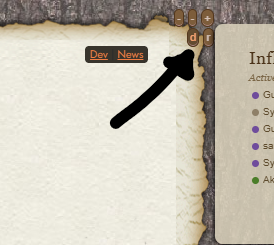
if you click the little 'd' button on the top right of the main parchment area, you could shift over the main section to the left slightly to reduce overlap, then click the 's' button to save it. edit: this button. it allows you to manually move/edit your ui
-
pff, at least magohi missed me :D
-
i hate blind auctions... >_< it makes people risk drastically overpaying or misjudging the auction on a rare item, both create stupid scenarios...
-
most forum bids work that way too so, makes sense?
-
i blame me :( i asked if getting creature wins on it was a bug, it replied it was not, then quietly changed it to a 15 minute cooldown for some reason, now everyone is mad at me (myself included) D:
-
also swearing then deleting
-
maybe who cast it :P
-
if there is anyone that comes here looking for the images and also sees errors on them like i did. just ...just click on the images...it'll take you to a standalone viewer that actually works...please don't ask me how long it took me to notice that
-
i did the entire list myself back in 2013/2014, it might be outdated, feel free to use, it , check it, or do nothing. 2013 res.xlsx
-
i have no idea what i am looking at but for some reason i feel very naked
-
probably...at least for the new ones...
-
most important tip: the cauldron listens to only the LAST line in the chat. if someone talks right after an instruction, send the instruction again, because it missed it. this is probably a bug, but it's been like this forever.
-
https://drive.google.com/file/d/17lM6wATe3FvhUMSRu0ixEM0cZ7Jd-7-B/view?usp=sharing here is a link to my google drive where i have uploaded a copy (but not with a debt repaid, sorry)
-
ability to asign your own default attack ritual, so it doesn't always set to random. i would like to sit my attack rit to detail to reduce the amount of clicks/RSI i deal with . similarly. it would be nice to be able to default to normal attacks beacuse tabbing over to classic every time is rough.
-
It's me! i found myself back here again, hello! i took a few days to look around, everything is so different now, maybe good, maybe not so good, but it seems like i am here again to find out :D
-
this should be fixed now
-
for location: maybe a basement area in GG somewhere where a mad scientist's playground just got uncovered and now new tech is available to everyone as they discover the wild machinery and learn it's uses
-
sampleuse.php is throwing up the following error, and does not display any examples
-
Spells do not appear to be sending their words into chat, casting a spell gives you the trigger but there are no chat words. normal chat seems to work fine though.
-
-
the ones i remember are: teleport papercabin toadspeak movelock (i think) attacklock (i think) there was also some spell that could return to goe/pc but it only if they were under certain days as for potential help spells, locate would be a good candidate to add if it wasnt there already
-
i went and examined the book and got no error